
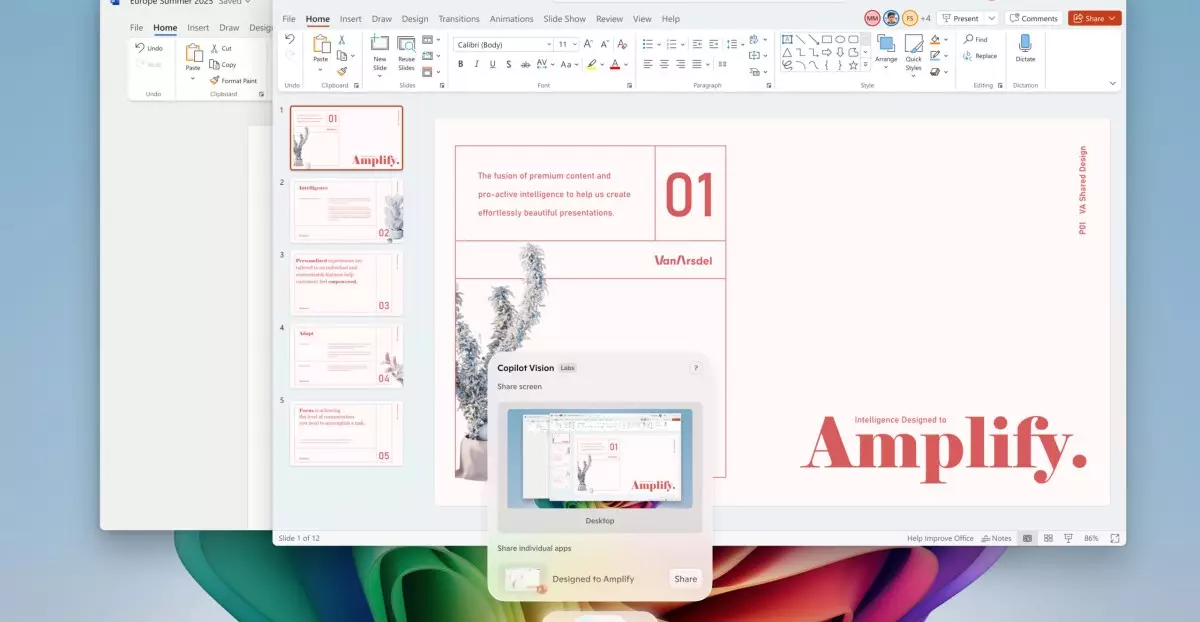
Microsoft’s latest expansion of AI capabilities in Windows 11 marks a pivotal moment in personal computing. By introducing advanced tools like Copilot Vision and AI-enhanced features, the company is positioning Windows as not just a versatile operating system but a smart, intuitive companion. This isn’t merely an incremental update; it signifies a bold leap toward embedding artificial intelligence into everyday tasks, making computing more accessible, efficient, and engaging.
What sets these innovations apart is their ability to analyze the entirety of your screen in real time. Unlike traditional tools that require manual input or navigation, Microsoft’s Copilot Vision acts as an intelligent narrator and assistant, understanding and interpreting diverse content across multiple applications and web pages. This capability fundamentally shifts how users can interact with their devices, emphasizing natural language commands and visual understanding rather than complex menu navigation. The AI’s ability to answer questions about displayed content, such as modifying images or understanding complex data, unlocks new levels of productivity for both casual users and professionals.
For creative workflows, features like the AI-powered sticker generator in Paint and the object select tool exemplify how AI can boost artistic expression. These tools reduce the technical barriers involved in editing images or creating visual content, empowering users to focus on their ideas rather than the mechanics of design. Such enhancements illustrate Microsoft’s confidence that AI can serve as a creative partner, elevating user experiences from mere utility to imaginative exploration.
Elevating User Interaction with Contextual AI Assistants
One of the most compelling aspects of Microsoft’s new suite is the natural language agent embedded within Windows settings, available on Snapdragon-powered Copilot Plus devices. This feature transforms the traditionally tedious process of configuring your PC into a conversational experience. Instead of hunting through menus, users can simply say, “Enable quiet hours,” or “Connect my Bluetooth device,” and the AI agent executes the task. This shift from click-intensive procedures to voice-based commands exemplifies a future where devices anticipate and fulfill user needs seamlessly.
Additionally, the “Click to Do” feature introduces a revolutionary method for multi-step task automation. By holding down the Windows key and clicking on content, users activate quick action menus tailored to the selected item. The ability to draft documents, schedule meetings, or practice pronunciation directly from this menu signifies an AI-driven streamline that minimizes effort and maximizes efficiency. It transforms passive browsing into an active, productive session, where AI assists in instantaneously carrying out complex actions.
This multi-layered interaction design reveals a broader trend: AI is no longer a separate tool but an integrated, omnipresent guide in our digital lives. Whether for professional tasks or personal creativity, these features emphasize a future where users feel supported and empowered by their devices rather than constrained by them.
Exclusive Features and Broader Accessibility
Microsoft’s ambition doesn’t stop at mainstream accessibility. The rollout strategy distinguishes between general Windows 11 users and those equipped with Copilot Plus PCs, especially Snapdragon-powered devices. The latter gain exclusive access to a suite of advanced AI tools, including AI lighting adjustments in Photos, precise screen capture with the “perfect screenshot” tool, and a new AI-powered sticker generator. These enhancements target power users and creatives who crave more sophisticated control over their content.
The strategic separation of features emphasizes Microsoft’s aim to foster a tiered ecosystem where premium hardware unlocks advanced AI functionalities. This could incentivize users to upgrade their devices or consider premium models, aligning with a broader industry trend that ties hardware capabilities to software innovations. While this might raise questions about accessibility and equity, it undeniably positions Microsoft at the forefront of AI-infused hardware-software integration.
However, Microsoft’s commitment to integrating new features across all Windows 11 devices—such as a color picker in the Snipping Tool or automated system troubleshooting—demonstrates a balanced approach. These updates ensure that even casual users benefit from smarter tools, broadening the impact of AI on everyday computing.
In essence, Microsoft’s AI enhancements signal a decisive step toward a smarter, more adaptable Windows. They challenge the traditional notion of computing as a rigid, task-driven environment and instead invite users into a fluid, interactive experience. As these features become more widespread and refined, they could fundamentally reshape how we think about human-computer interaction, blending creativity, efficiency, and intelligence into a cohesive digital partner.
 English
  Spanish